Deployment Guide
The Data Product Dashboard is built for continuous operation within a Kubernetes cluster. It functions as a service that enables access to data products created by various pipelines and saved on a shared persistent volume.
Pre-requisites
Metadata File:
To ensure data products appear on the Data Product Dashboard, the folder containing the data product files must include a metadata file. Refer to ADR-55 : Definition of metadata for data management at AA0.5 for details on the metadata file format.
Shared Persistent Volume:
The Data Product Dashboard needs to access the same persistent volume (PV) where the data products reside. These data products are typically written by pipelines deployed in a different namespace than the Data Product Dashboard. To enable access, you need to configure the persistent volume claim (PVC) correctly to share the PV between the namespaces.
For more information on configuring shared storage between namespaces in SKAO clusters, refer to the guide: Guide to Sharing Storage Between Namespaces in SKAO Clusters..
Once the PVC is configured correctly, you can update the deployment’s values file with the appropriate details. The following extract from a values file shows an example configuration for the shared PVC in the DP cluster (replace shared with your actual PVC name):
dataProductPVC:
  name: shared
  create:
    enabled: false
    size: 5Gi
    storageClassName: nfss1
Helm chart configuration options
This section details the configuration options available when deploying the Data Product Dashboard in Kubernetes using Helm.
Ingress:
Value |
Default |
Comment |
|---|---|---|
|
|
Whether the Ingress should be enabled. |
|
|
Whether the namespace should be added to the ingress prefix. |
|
|
The domain name where the application will be hosted. Used for MS Entra redirect URI. |
Data product API:
Value |
Default |
Comment |
|---|---|---|
|
|
If the ska-dataproduct-api should be enabled. |
|
|
The link to the artefact repository |
|
|
The version of the ska-dataproduct-api to use. |
|
|
The pull policy of the ska-dataproduct-api. |
|
|
What the prefix for the ska-dataproduct-api path should be. |
|
|
The path to the data on the PV. |
|
|
The name of the data products metadata file that is used to indicate that a folder is a data product. |
|
|
Enables the deployment to retrieve SPA registration details from the SKAO vault. |
|
|
Path to the secrets in the vault. |
|
|
Path to the secrets as mapped into the API container. |
|
|
The ElasticSearch port. |
|
|
The ElasticSearch host. |
|
|
The ElasticSearch metadata schema. |
|
|
The ElasticSearch CA certificate file name. |
|
|
The ElasticSearch user. |
|
|
The ElasticSearch indices to be used for the search store, following the convention ska-dp-dataproduct-<Data center>-<namespace>-<version>. For example “ska-dp-dataproduct-sdhp-stfc-integration-v1” |
|
|
The maximum number of ElasticSearch results returned by a query. |
|
|
The PostgreSQL port. |
|
|
The PostgreSQL host. |
|
|
The PostgreSQL user. |
|
The PostgreSQL database name. |
|
|
The PostgreSQL schema name. |
|
|
|
The PostgreSQL table name. |
|
|
Data downloaded are streamed in stream_chunk_size chunks. |
|
|
The requested minimum CPU usage of the api. |
|
|
The requested minimum memory usage of the api. |
|
|
The maximum CPU usage of the api. |
|
|
The maximum memory usage of the api. |
Data product API secrets:
The following secrets are expected in the file mapped into the API container by the vault:
Secret |
Comment |
|---|---|
|
The ElasticSearch password. |
|
The ElasticSearch password. |
|
The PostgreSQL password. |
Data product Dashboard:
Value |
Default |
Comment |
|---|---|---|
|
|
If the ska-dataproduct-dashboard should be enabled. |
|
|
The link to the artefact repository |
|
|
The version of the ska-dataproduct-dashboard to use. |
|
|
The pull policy of the ska-dataproduct-dashboard. |
|
|
What the prefix for the ska-dataproduct-dashboard path should be. |
|
|
Enable mocked authentication. |
|
|
Enables the deployment to retrieve SPA registration details from the SKAO vault. |
|
|
Path to the secrets in the vault. |
|
|
Placeholder env variable for MS Entra application registration client ID. |
|
|
Placeholder env variable for MS Entra application registration tenant ID. |
|
|
The polling rate for new data from the API. |
|
|
The requested minimum CPU usage of the dashboard. |
|
|
The requested minimum memory usage of the dashboard. |
|
|
The maximum CPU usage of the dashboard. |
|
|
The maximum memory usage of the dashboard. |
Permissions API:
Value |
Default |
Comment |
|---|---|---|
|
|
If the ska-permissions-api should be enabled. |
|
|
The link to the artefact repository |
|
|
The version of the ska-permissions-api to use. |
|
|
The pull policy of the ska-permissions-api. |
|
|
What the prefix for the ska-permissions-api path should be. |
|
|
Enables the deployment to retrieve WEB API registration details from the SKAO vault. |
|
|
Path to the secrets in the vault. |
|
|
Placeholder env variable for MS Entra application registration client ID. |
|
|
Placeholder env variable for MS Entra application registration tenant ID. |
|
|
The requested minimum CPU usage of the api. |
|
|
The requested minimum memory usage of the api. |
|
|
The maximum CPU usage of the api. |
|
|
The maximum memory usage of the api. |
Shared persistent volume:
Note
Only enable the creation of a PVC here when running the application locally or in tests where the shared PCV is not used.
Value |
Default |
Comment |
|---|---|---|
|
|
This is the name of the PVC that is shared between the namespace used by the pipeline that create data products and the namespace where the Data Product Dashboard is deployed. |
|
|
Enable the creation of a PVC when running the application locally or in tests where the shared PCV is not used. |
|
|
The size of the requested PVC. |
|
|
The storage class of the requested PVC. |
Deployment from GitLab pipelines
If configured, the deployment can be done with GitLab pipelines, deploying into pre-configured environments to one of three namespaces (ci-dev, integration or staging)
Development branches:
During development, developers can deploy the development branches into the ci-dev namespace from the Gitlab pipeline. Here the installation use the local chart in the repository for deployment:
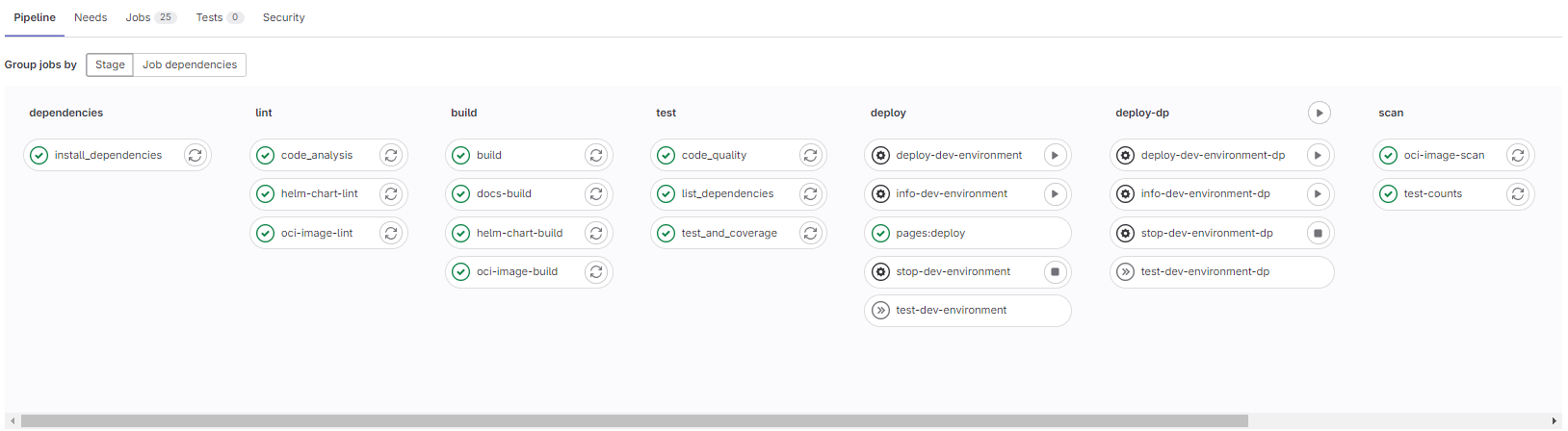
Deployment from pipeline on dev branch
Master branch:
From the master branch, the application can be deployed into the integration or staging namespace of each environment. For these deployments released chart from CAR is used.
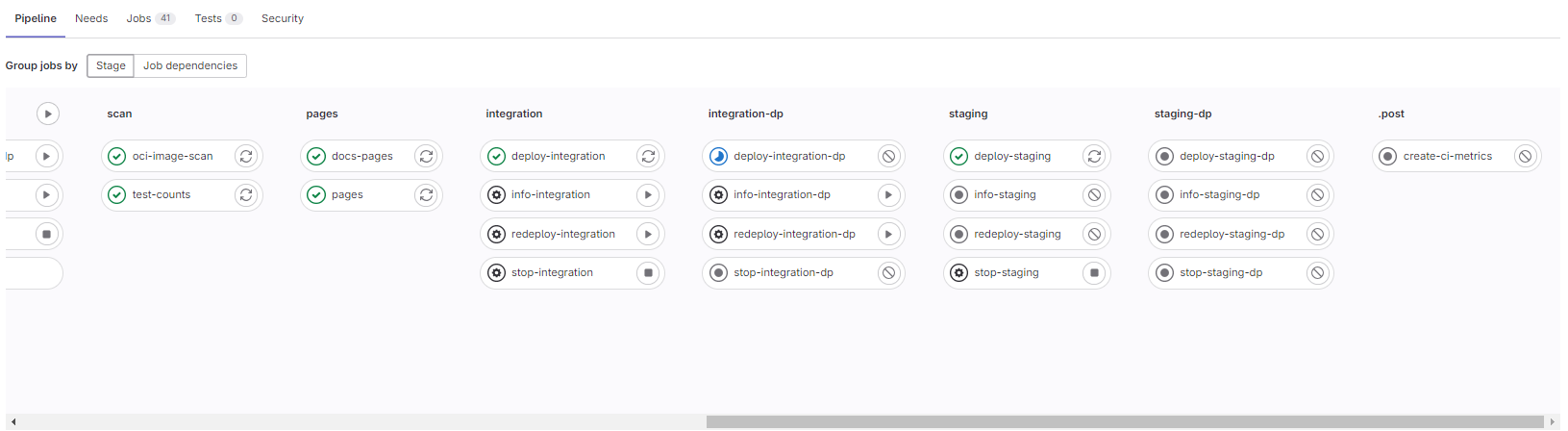
Deployment from pipeline on master branch
The deployed Data Product Dashboard should then be accessible at: “https://sdhp.stfc.skao.int/$KUBE_NAMESPACE/dashboard/”, and the backend should be accessible at: “https://sdhp.stfc.skao.int/$KUBE_NAMESPACE/api/”